
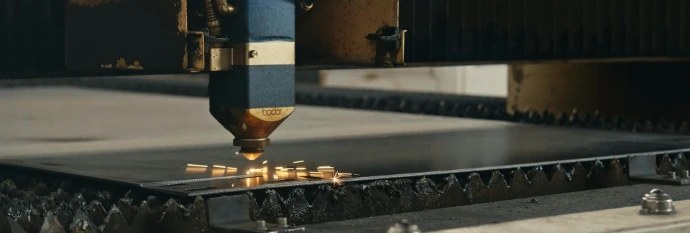
Make laser-cut holes at least as wide as the material is thick: 3 mm holes or bigger in 3 mm steel, 6 mm or bigger in 6 mm plate. That's the starting rule most shops work to, and parts drawn to it cut cleanly without anyone needing to phone you.
Can you go smaller? Sometimes, especially in thin sheet. But below that line the hole gets harder to cut round, the edge gets rougher, and the price of a rejected batch goes up. Spacing matters as much as size: a perfectly sized hole in the wrong place will still distort. Below are the rules for hole size, hole spacing, and holes that need threads.
Why small holes are hard to laser cut
A hole isn't just a short circle of cutting. Every hole starts with a pierce: the laser burns straight down through the sheet before it can move sideways. On thicker plate that pierce leaves a small crater of molten metal and spatter, and it takes time.
In a big hole, the pierce is made in the middle of the slug that falls out, and a lead-in line takes the beam out to the edge. In a tiny hole there's no room for that. The pierce lands close to the finished edge, and the heat has nowhere to go. You get holes that are slightly out of round, tapered through the thickness, or with dross clinging to the bottom.
There's also the slug itself. A small slug can tip up or get stuck in the slats of the cutting bed instead of dropping clear, and a tipped slug can catch the cutting head.
Starting rules by thickness
These are rules of thumb for mild steel on a fibre laser. Stainless and aluminium are similar, and some shops can go tighter on thin sheet. Treat them as safe defaults, not hard limits.
| Material thickness | Minimum hole diameter (starting rule) | Minimum web between holes | Minimum distance from edge |
|---|---|---|---|
| 1 mm | 1 mm | 1 mm | 1 mm |
| 2 mm | 2 mm | 2 mm | 2 mm |
| 3 mm | 3 mm | 3 mm | 3 mm |
| 5 mm | 5 mm | 5 mm | 5 mm |
| 8 mm | 8 mm | 8 mm | 8 mm |
You'll notice the pattern: one material thickness, everywhere. That makes it easy to check a drawing. Look at the thickness, then look for any hole, slot, web, or edge distance smaller than that number.
On thin sheet you can often get away with holes a bit smaller than the thickness, because the pierce is quick and there's less heat. On thick plate, the rule tightens in practice, and very small holes are better drilled after cutting.
Slots, webs, and holes near edges
The same logic applies to every narrow feature.
Slots should be at least one thickness wide. A 1.5 mm slot in 3 mm steel is asking for trouble, for the same reasons as a small hole.
Webs, the strips of metal left between two holes or between a hole and a slot, should also be at least one thickness. A thinner web gets very hot as the cuts either side of it are made, and it can warp, burn through, or curl.
Edge distance follows suit: keep holes at least one thickness from the outside edge. Closer than that, the thin bridge to the edge can bulge, and it's weak in service too. If a hole simply has to be close to the edge, consider turning it into an open notch instead.
Perforated panels with hundreds of closely spaced holes are a special case. The heat builds up across the sheet, so the cutting sequence matters as much as the hole size. If you're designing a mesh or vent pattern, tell the shop what it's for and ask what pitch works in that material.
Holes near bends
If the part will be bent, holes too close to the bend line will stretch into ovals and can pull out of position. A practical rule is to keep holes at least about 2.5 × thickness plus the inside bend radius away from the bend line.
For a 2 mm mild steel bracket with a 2 mm inside radius, that's about 7 mm from the bend line to the edge of the hole. Our guide on hole distance from a bend explains where to measure from and what to do when a hole has to sit closer.
Holes for threads, pins, and close fits
Laser-cut holes are excellent for clearance holes, the ones a bolt passes through. They're less ideal where a hole has to be a precise fit.
- Tapped holes. Draw the hole at the tap drill size for the thread you want, and note the thread on your PDF drawing. Tapping is a separate operation after cutting, so make sure whoever prices the job knows about it.
- Dowel and pin holes. If a pin must be a snug fit, consider having the hole cut slightly undersize and drilled or reamed to size. Ask the shop what suits the material.
- Holes in thin sheet that need thread strength. In 1–2 mm sheet there isn't enough material for more than a couple of threads. Rivet nuts, weld nuts, or self-clinching fasteners usually work better.
Also remember that powder coating adds thickness inside holes. A typical single coat is 60–80 µm, so a close-fitting hole may need masking or a slightly larger size if it's coated.
Don't compensate holes yourself
Draw holes at the size you want them to measure. The cutting software accounts for the beam width, called kerf, on every edge. If you shrink holes to allow for the laser, they'll be compensated twice and come out oversize.
The same applies if your file came from someone else. Check one hole against a known bolt size before sending. Our post on how to prepare a DXF file for laser cutting has a full pre-send checklist.
Sending a part with small holes
If your part has holes, slots, or webs below one thickness, flag it on the quote. Say what the hole is for: "M4 clearance", "6 mm pin, snug fit", or "vent hole, size not critical". That tells the shop whether to cut it as drawn, suggest a change, or plan a drill operation.
Upload the drawing with the material, thickness, and quantity, and start a laser cutting quote. You can read more about the process on our laser cutting page.